




QNScheduling is a simulation framework for scheduling quantum network applications using Packet Generation Attempts (PGAs). The simulator simulates on-demand entanglement packet scheduling with static and dynamic scheduling strategies, different routing schemes, network-layer modeling, and stochastic entanglement generation with link contention.
Overview
Key Features
- Application Generation
Generate batches of quantum applications with configurable source/destination nodes, periods, packet counts, and EPR pair requirements.
- Budget Computation
Compute per-application PGA budgets based on network-layer models and entanglement swapping.
- Flexible Scheduling
Choose between static EDF timetables or dynamic online EDF-like scheduling strategies.
- Stochastic Simulation
Run simulations of entanglement generation/swapping with link contention, deferrals, retries, and drops.
- Comprehensive Analysis
Export results and summary metrics as CSV files for analysis.
Architecture
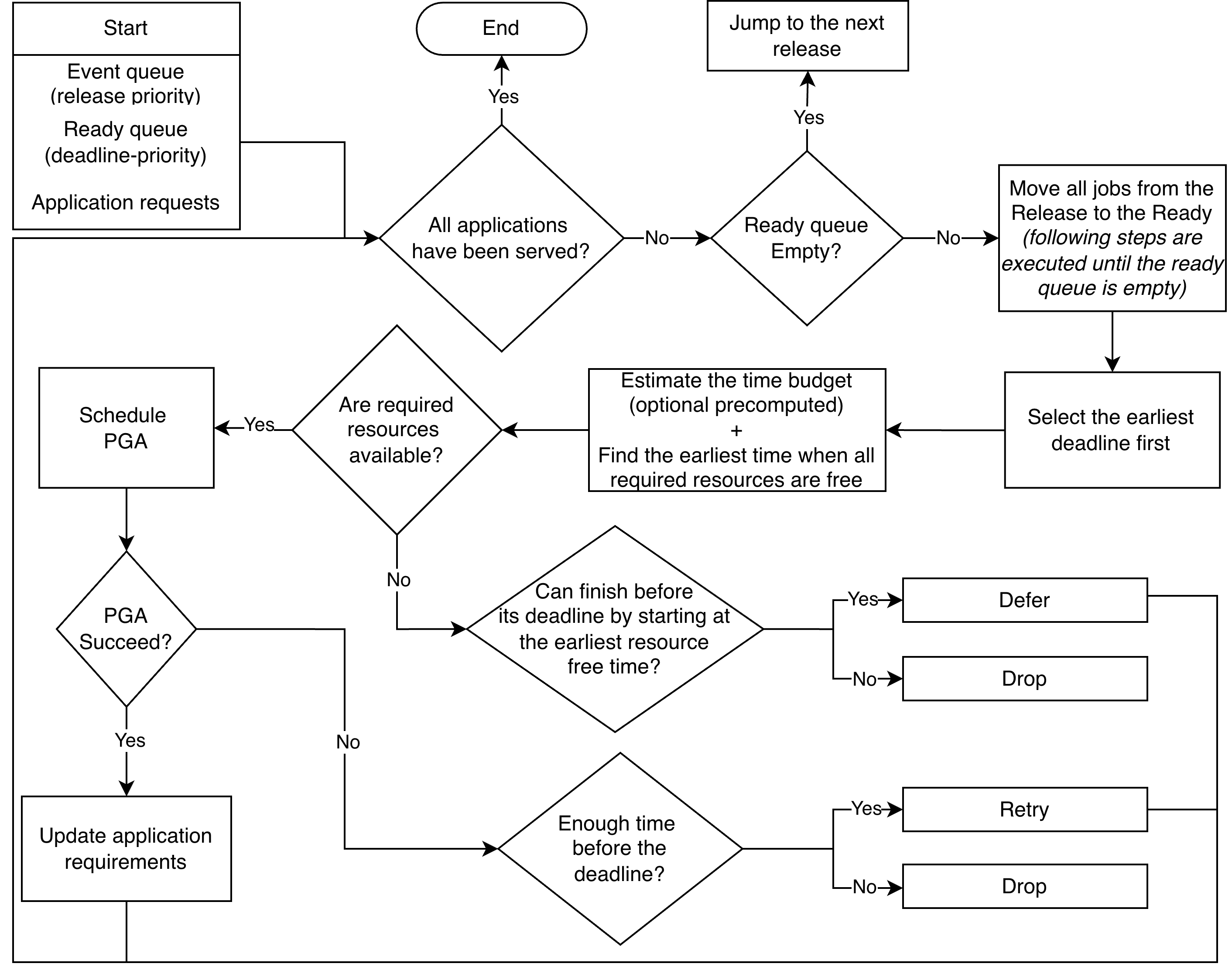
Dynamic Online Scheduler Workflow
The high-level workflow of the dynamic scheduler for entanglement packets:
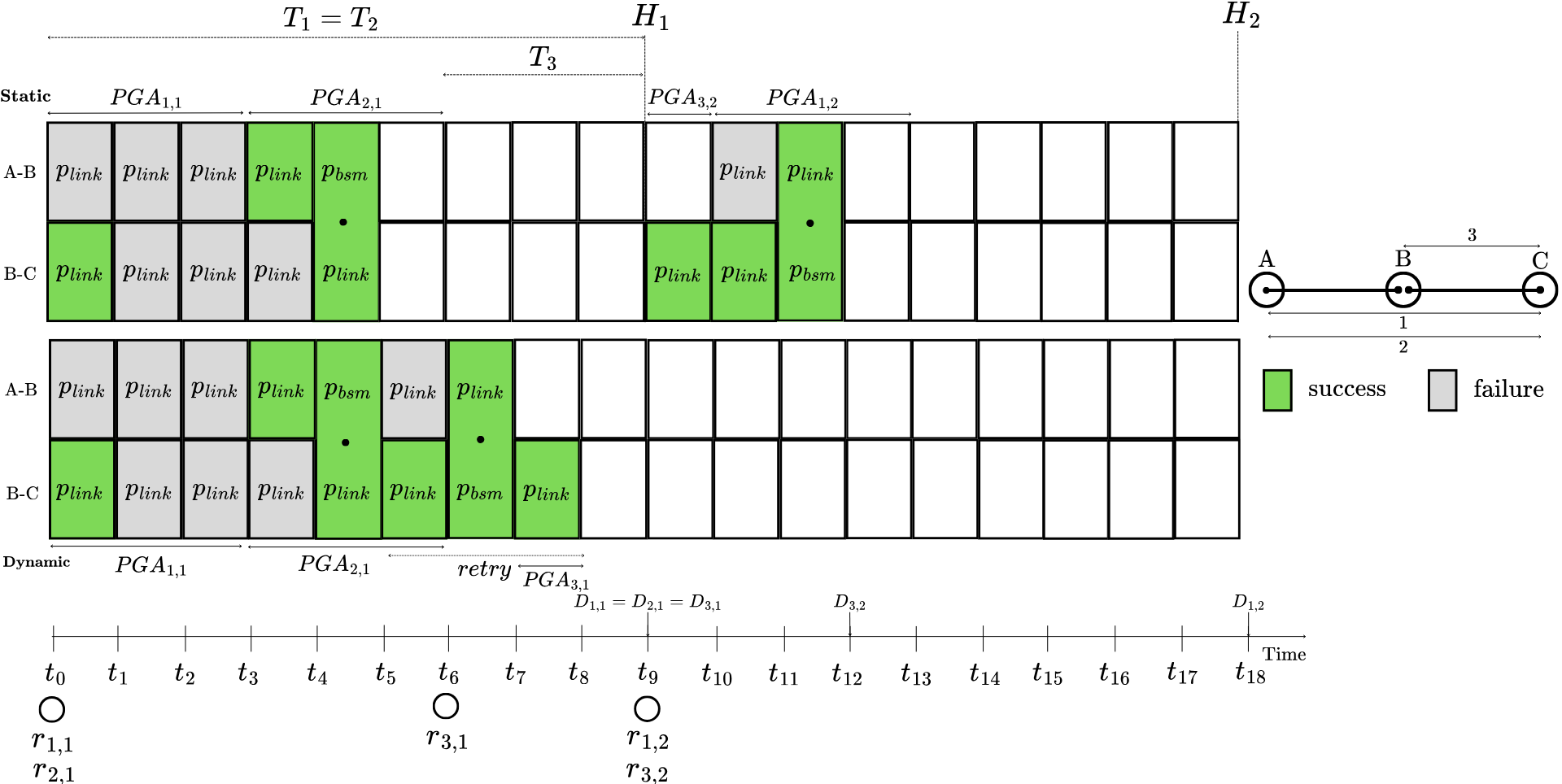
Network-Layer Model
Example of the network-layer model with two schedulers (linear chain A-B-C) and 3 applications/flows:
Network Topologies
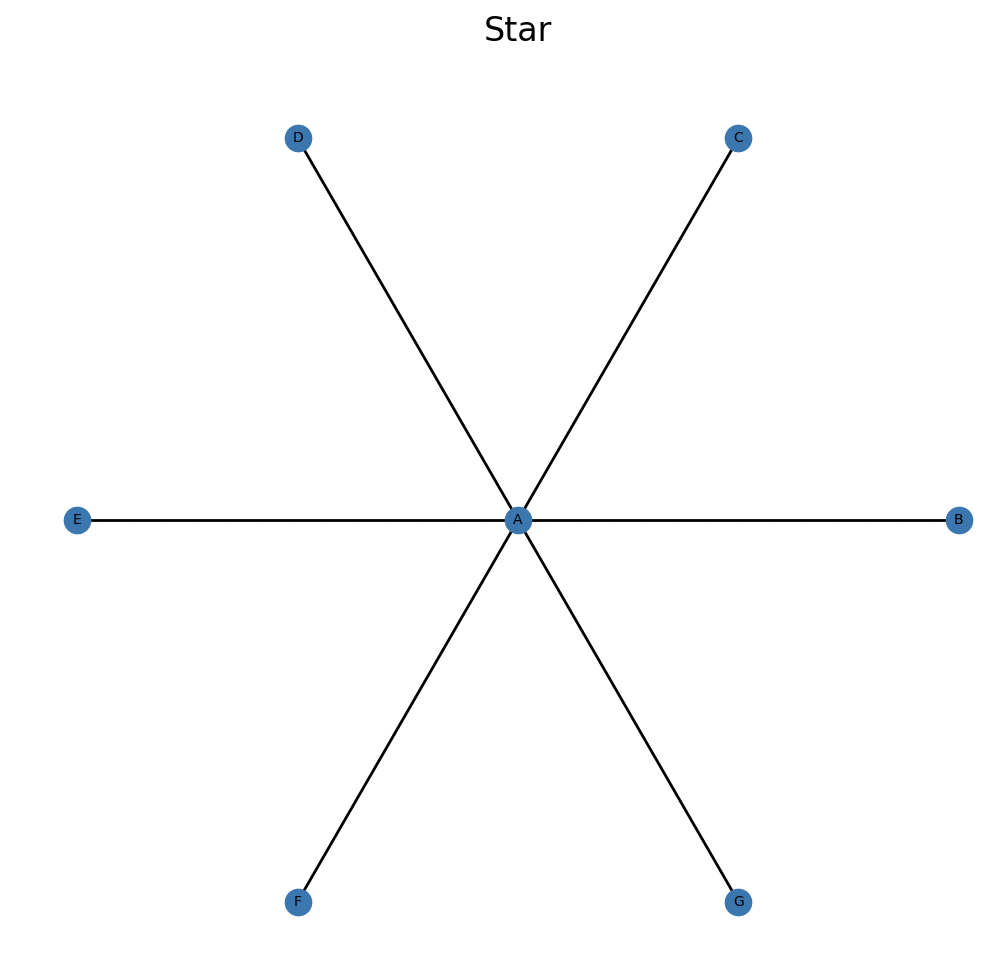
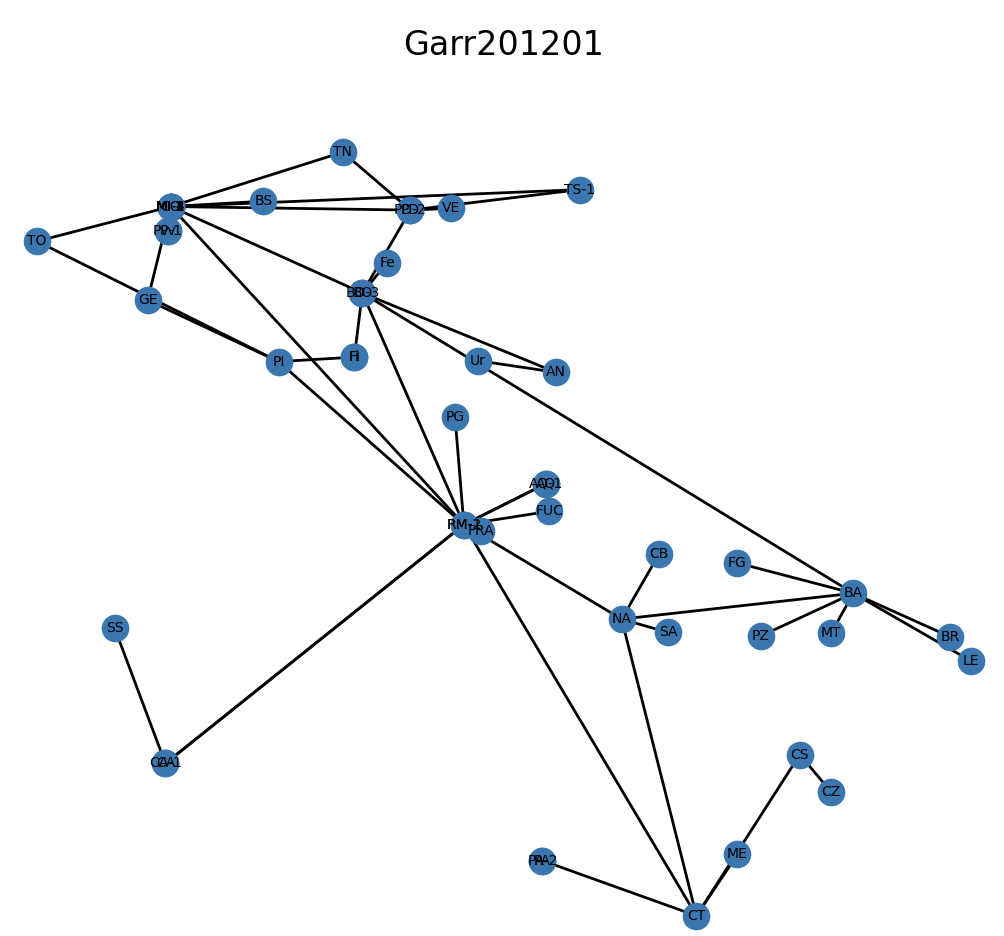
QNScheduling provides basic and advanced network topologies stored as .gml files.
Basic Topologies include simple networks like chains, meshes, rings, stars, and dumbbells:
Advanced Topologies include real-world network topologies from the Internet Topology Zoo:
Getting Started
Installation
Create a Python Virtual Environment:
python3 -m venv .venv
source .venv/bin/activate
python3 -m pip install -U pip
Install the requirements:
pip install -r requirements.txt
Verify the installation:
pytest
Quick Start
Run the simulator with default settings:
python -m scheduling.main
Usage Guide
Scheduling Modes
Static Scheduler
Use --scheduler static for offline precomputed EDF scheduling:
Builds a static schedule over a hyperperiod horizon
Uses a conflict graph for concurrency (applications sharing links cannot overlap)
Performs feasibility checks:
Rejects applications with utilization U = duration/period > 1
Rejects schedules that would miss deadlines (end > deadline)
Dynamic Scheduler
Use --scheduler dynamic for online EDF-like scheduling:
Online scheduling with dynamic arrival handling
Arrivals are periodic by default; use
--arrival-ratefor Poisson process arrivalsSupports admission control, scheduling, deferral, retry, and drop mechanisms
Routing Strategies
QNScheduling provides different routing strategies:
Shortest Path Routing (Default)
Use --routing shortest (default) for shortest path routing:
Computes shortest paths that meet minimum fidelity requirements
Minimizes the number of hops within the maximum path length (L_max) derived from fidelity constraints
Suitable for most basic use cases and simple network topologies
Does not consider link congestion or capacity constraints
Selects the first feasible path found
Yen Random Routing
Use --routing random for randomized path selection among feasible paths:
Uses Yen’s K-shortest paths algorithm
Randomly selects among all shortest paths that satisfy fidelity constraints
Provides load balancing through randomization
A baseline for distributed routing without global network state awareness
Each application gets a uniformly random feasible path
Hub-Aware Routing
Use --routing degree for hub-aware routing that avoids high-degree nodes:
Selects paths that minimize the maximum node degree among internal (non-endpoint) nodes
Helps avoid congestion at network hubs and central nodes
Distributes load away from highly connected nodes
Among feasible paths, choose the shortest path
Capacity-Aware Routing
Use --routing capacity for capacity-aware routing with explicit utilization tracking:
Tracks link utilization and excludes overloaded links from routing
Routes traffic through less congested paths to balance network load
Requires setting
--capacity-thresholdto define the maximum acceptable link utilizationComputes PGA duration for each application and updates link capacities incrementally
Applications are routed in order of their relative deadline (PGA duration / period)
Helps prevent bottlenecks in heavily loaded networks
All routing respect the minimum fidelity threshold by computing a maximum path length (L_max) based on the application’s minimum fidelity requirement and the network’s initial fidelity. Paths exceeding this length are not considered.
PGA Status
Status appearing in pga_results.csv:
- completed:
Generated required E2E EPR pairs within budget time (PGA)
- failed:
Ran but didn’t generate enough pairs by the end of PGA
- retry:
Failed attempt that is rescheduled again (dynamic scheduler)
- defer:
Could not start due to busy links, rescheduled to later (dynamic scheduler)
- drop:
Cannot start/finish by deadline constraints (dynamic scheduler)
Command-Line Options
Run python -m scheduling.main --help for the complete list of options.
Network Configuration
--config,-cPath to network topology
.gmlfile (default:configurations/network/Dumbbell.gml)--routing,-rRouting scheme:
shortest(default, fidelity-constrained shortest path),random(Yen random),degree(hub-aware), orcapacity(capacity-aware)--capacity-threshold,-ctCapacity threshold for routing capacity per link (used with capacity routing)
Application Parameters
--apps,-aNumber of applications to generate (a)
--inst MIN MAX,-i MIN MAXRange of number of required entanglement packets per application (I_a)
--epr MIN MAX,-e MIN MAXRange for EPR pairs requested per application (q_a)
--period MIN MAX,-p MIN MAXRange for application periods in seconds (T_a)
--min-fidelity MIN MAX,-f MIN MAXRange for application minimum fidelity (F_a). If omitted, minimum fidelity is not considered.
Physical Layer Parameters
--ppacket,-ppTarget probability to compute PGA duration (p_packet)
--memory,-mMemory multiplexing: number of independent link-generation trials per slot (m)
--pswap,-psBell State Measurement probability success (p_bsm)
--pgen,-pgEPR generation success probability per trial (p_gen)
--slot-duration,-sdSlot duration in seconds (τ)
Scheduler Options
--scheduler,-schScheduling strategy:
staticordynamic--hyperperiod,-hpNumber of hyperperiod (H_i) cycles to schedule/simulate (static scheduler only)
--arrival-rate,-arMean arrival rate λ for Poisson arrivals (dynamic scheduler). If omitted, arrivals are periodic.
General Options
--seed,-sRNG seed for reproducibility (NumPy)
--output,-oOutput directory root (default:
results)
Example Commands
Dynamic Scheduler with Poisson Arrivals
python -m scheduling.main \
  --config configurations/network/basic/Dumbbell.gml \
  --apps 2 \
  --inst 2 2 \
  --epr 2 2 \
  --period 10.0 10.0 \
  --ppacket 0.1 \
  --memory 50 \
  --pswap 0.95 \
  --pgen 0.001 \
  --min-fidelity 0.6 0.6 \
  --slot-duration 0.0001 \
  --seed 42 \
  --scheduler dynamic \
  --arrival-rate 1.0 \
  --output results
Static Scheduler with Hyperperiod
python -m scheduling.main \
  --config configurations/network/basic/Dumbbell.gml \
  --apps 2 \
  --inst 2 2 \
  --epr 2 2 \
  --period 10.0 10.0 \
  --hyperperiod 2 \
  --ppacket 0.1 \
  --memory 50 \
  --pswap 0.95 \
  --pgen 0.001 \
  --min-fidelity 0.6 0.6 \
  --slot-duration 0.0001 \
  --seed 42 \
  --scheduler static \
  --output results
Capacity-Aware Routing with Dynamic Scheduler
python -m scheduling.main \
  --config configurations/network/basic/Dumbbell.gml \
  --apps 2 \
  --inst 2 2 \
  --epr 2 2 \
  --period 10.0 10.0 \
  --ppacket 0.1 \
  --memory 50 \
  --pswap 0.95 \
  --pgen 0.001 \
  --min-fidelity 0.6 0.6 \
  --slot-duration 0.0001 \
  --seed 42 \
  --routing capacity \
  --capacity-threshold 0.8 \
  --scheduler dynamic \
  --arrival-rate 1.0 \
  --output results
Output and Metrics
Output Structure
Each run creates a new folder under results/seed_<seed>/runN/ containing:
app_requests.csvPer-application request details including source node, destination node, minimum fidelity, period, and EPR requirements.
link_utilization.csvPer-link busy time and utilization statistics over the observed makespan.
link_waiting.csvPer-link waiting totals, average waiting time, and average queue length metrics.
params.csvComplete parameter set used for the run, including runtime and run number.
pga_results.csvDetailed per-attempt (PGA) logs with arrival time, start time, burst duration, completion time, waiting time, status, and more.
summary.csvAggregate metrics including makespan, throughput, completion ratios, waiting statistics, and utilization statistics.
summary_per_app.csvPer-application breakdown showing counts of each status type and PGA duration statistics.
Key Performance Metrics
- Throughput Metrics
Througput (PGAs completed per unit time)
Completion ratios (completed/total PGAs)
- Timing Metrics
Total makespan (simulation time)
Average PGA duration
Per-link waiting times
P90/P95 waiting times
- Resource Utilization
Per-link utilization
P90/P95 utilization
Per-link queue lengths
P90/P95 queue lengths
- Quality Metrics
Average Minimum fidelity per application
Average number of hops
Drop ratios (due to deadline misses)
Retry and deferral statistics (dynamic scheduler)